
S1 E18: 10 Tips for Creating Effective Flipped Lessons

For many teachers, one of the staple components of the elearning experience is the video lesson. Whether you are a seasoned video creator or recording your very first video lesson, following these tips from REALity Check season 1 episode 18 will help you create videos that will maximize student engagement.

Tip 1: Make a plan to change your plan.

  • Creating an outline or script before you record can help you stay focused and feel more comfortable while recording your lesson.  Try to avoid “using your originally scheduled notes packet” and recording long segments of video to match. The tricks we use in the classroom to help students engage aren’t an option in this setting so we need to rethink our overall approach.

Tip 2: Keep it short!

  • Speaking to student engagement, research shows that engagement with video lessons drops off significantly after 6 minutes.  Try to keep your videos between 6-9 minutes to avoid losing your students. This may mean creating several, smaller videos to discuss materials that you might have normally addressed in one class period.

Tip 3: Be clear about the goal for the video and discuss how the learning will be reinforced.

  • Starting with the purpose for the lesson can help students frame the learning that is about to take place.  Reference learning targets or standards and then reinforce what they will be doing with the information presented.  Why is learning the information important? What are they going to do with that information?

Tip 4: Include visuals to support key ideas but don’t include “brain-dump” slides.

  • Students don’t want to “read” your video just like they don’t want to read your PowerPoint slides.  Use visuals that help students connect the learning, empathize with the problems discussed, and understand the importance of the learning.  You can always include supplemental reading resources to help reinforce the information in the video.

Tip 5: Get your resources ready before recording.

  • Before you begin recording, make sure you have decided on your video format, that your visuals are cued up, that you know how to use the technology, and that you are plugged in and ready. This will limit the amount of editing you might have to do later.

Tip 6: Minimize background distractions.

  • Record in a quiet space with a plain background and decent lighting if possible.

Tip 7: Good audio makes for a good video.

  • Your students ability to hear what you are saying is very important.  Make a test video to check the quality of your audio and use a microphone if possible to ensure the audio is crisp and clear.

Tip 8: Be enthusiastic and include your face whenever possible. 

  • So much is communicated through our facial expressions and intonation.  Be excited about what you are presenting and include your “picture in picture” face if possible.  It will help your students feel connected and engage with the learning.

Tip 9: Stay focused, minimize rambling and move it along.

  • Remember that we want to keep these videos short and to the point.  That doesn’t leave a lot of time for rambling stories or uncomfortable pauses.  Don’t hesitate to practice a few times before actually recording the lesson to ensure you are speaking at a quick pace and staying on-topic.  Students can always rewatch segments if they didn’t catch all of it the first time.

Tip 10: Be yourself!

  • Don’t feel like you need to act like someone you are not or do goofy things to keep students engaged (unless that is something you normally do.)  Our students will appreciate seeing you and learning from you as you are.
S1 E17: “6 Reasons Why Grading in Schoology Can Make your Life Easier”

JOIN us on March 10 during lunch periods or after school where we discuss and begin to actually link our Schoology and PowerSchool gradebooks. Or listen to our podcast here!


*A brief recap *

Why should you use the Schoology Gradebook

  • Reason 1: Consistency between gradebooks
  • Reason 2: Keep the work in the hands of the students (literally — I don’t take it away)
  • Reason 3: Provide feedback DURING the process, not just after the product (Formative assessment)
  • Reason 4: Encourage a more paperless classroom
  • Reason 5: Hub your materials — efficiency
  • Reason 6: Greatly improved accuracy with grade sync

What can you do with Schoology?

  • Accept and grade a wide variety of submission types 
  • Create and use rubrics 
  • Create Google Drive Assignments
    • Students work from templates (documents or slides)
    • Collaborate with students during the process
  • Use autoscore features from assessments and edpuzzle assignments
  • Allow for resubmissions and rescoring
  • Track scoring comments to PowerSchool from the Schoology gradebook

S1 E16 Recap: Personalized Learning Part II – Strategies & Tools for Personalized Learning

Season 1 Episode 16 is a (kind of messy) follow-up to our discussion about the three Ps of personalized learning. In this episode, we highlight some strategies and tools for actually making personalized learning experiences work for your students.  Links have been provided for additional study.

Strategy #1 – Use assessment data to customize the student experience.

  • Whether that is a pre-assessment to gauge need or group students, formative assessment to inform next steps, or summative assessments to measure learning, this data and the decisions made based on the data are essential to effective, efficient personalized learning experiences.
    • Use tools like Formative, Schoology assessments, Gimkit, or Master Manager to gauge student progress.
    • Once you have your data, how are you going to use it to guide students to the correct learning activity?

Strategy #2 – Give Students Choice!

  • Allowing choice in path, pace and place can improve student motivation and engagement.
    • You could go all in with project-based learning experiences or just find smaller opportunities for students to have a voice in what, how, where, and how fast they are learning.
    • Revisit episode 15 for more information on this strategy or check out this ASCD article from Catlin Tucker entitled “When Students Drive the Pace, Space, and Path“.

Strategy #3 – Use technology to organize the learning experience.

  • Use your Schoology course pages (or other LMS tool) to “hub” the learning materials.
  • Set expectations and procedures with your students about using the LMS as a starting point to improve efficiency both in and out of the classroom.

Strategy #4 – Build personalized learning playlists.

  • Structure the material using Choice Boards or the Grid Method
    • For each learning target or standard, students have options for how they want to learn and demonstrate understandings.
    • Consider how many of tasks or experiences students need to complete in each area.
    • Also consider how Bloom’s Levels of Understanding may be scaffolded through the experience.
  • Structure the learning experience using HyperDocs (check out the blog post for episode 13 for more info.)
    • HyperDocs can mimic various learning cycles
    • HyperDocs can be created for full units, multi-day lessons, or for one-day lessons.
    • HyperDocs are NOT webquests
    • Don’t forget to build in assessments, choice, in-class & out of class expectations, and stopping points. HyperDocs don’t have to be fully open; create restrictions where they’re necessary
  • Symbaloo Learning Paths
    • Creates a game board like pathway of activities and assessments that students can work through and teachers can use to track progress.  Options can be included to allow students the opportunity to pick their own path.

Strategy #5: Use ed-tech to create flipped and personalized learning experiences.

  • EdPuzzle
    • Great for flipping content and formatively assessing understanding.  Allows students to watch the lesson at their own pace and allows teachers access to progress.
    • EdPuzzle experiences can be assigned and monitored through Schoology. Stop in to the LRC Clubhouse for our REALity Check Tech session on March 18th to learn more.
  • Consider creating learning centers or using the station rotation model that includes tech-based stations
    • Which ones need the teacher?
    • Which can be flipped?
    • Which can the students complete independently?

Strategy #6: Allow students to take a more active role in their learning.

  • Include students in goal setting and progress tracking for their own learning.
    • Use shared docs, google forms, exit/entrance tickets, journals, etc. to monitor progress and celebrate successes.
  • Consider using assessment windows that allow students some choice in when they are ready to take or turn-in their summative assessments.
    • What needs to be done before the assessment to show readiness?
    • Is there time for feedback and revisions within or after the assessment window?

S1 E 14 Recap: Students as Individuals

In Season 1, Episode 14, I sat down with Rachel Lesinski to discuss the importance of differentiation and personalized learning for our students. She shared stories from her conversations with students about what they wanted to engage in and the variety of answers they provided. Our students are so unique so it is not a surprise that singular approaches to instruction and assessment will leave out many of them. Here are a few tips from our conversation.

  1. Start Small – Any opportunity you take to listen to the thoughts and interests of your students can begin to shift the culture of learning.
  2. Provide Choices – Identify opportunities to provide your students with choice in your class. (listen to episodes 15 & 16 for more information)
  3. Be Responsive – Use the data you collect about student progress to inform “next steps” in your classroom.
  4. Be Respectful – Model for your students the type of respectful interactions that you hope they demonstrate while working with others.

S1 E15 Recap: The Three Ps of Personalized Learning

Although we were first introduced to the Three Ps from our work supporting BlendEd teachers, we believe that the concept of student choice in PATH, PACE, & PLACE can apply to any type of course interested in providing personalized learning opportunities for their students. In Season 1, Episode 15, hosts Shanna Piggott and Victoria Lobb discuss ways to personalize learning for students by modifying path, pace, and/or place for your students.

Questions to Consider about Path

  • What do students need to “do” to learn and demonstrate mastery of the skill or content?
  • Are there opportunities to provide student choice in the content, the learning activities, or the product they use to demonstrate their learning? 
  • Is it necessary for every student to do the same thing in the same order?
  • What role will formative assessment results play in determining the path students take?

Questions to Consider about Pace?

  • How much time is available for students to learn and demonstrate mastery?
  • Will students set their own goals for when things will be worked on and completed?
  • Will students have time to relearn and revise?
  • In what ways can students extend their learning if they attain mastery more quickly?

Questions to Consider about Place?

  • Are there ways to create flexible spaces within your classroom?
  • Do students need to do your work in your class?
  • What do the students need you there for?
  • What experiences could also work as flipped experiences?

Personalizing the learning experience is a great way to motivate and engage students, however, it does come with a whole set of challenges. It may take time to build the positive relationships and trust with your students that makes personalized learning effective and efficient. Stay transparent with your students about the goals of the personalized experiences and encourage them to reflect on their own learning.

The idea of creating and managing a variety of learning experiences for your students may seem overwhelming. Take advantage of the plethora of digital resources available as you get started and build up your library of choice options over time. Check out our next episode (S1 E16) for more specific strategies and tools for providing personalized learning experiences for your students.

REALity Check S1 E12: Differentiation, Part I

Welcome to Differentiation Part I: What is it? What isn’t it? This episode addressed a more philosophical approach to differentiated instruction in the regular education classroom, and the next episode will address more practical approaches and strategies.

Let’s start here. If you’re reading along with me, do me a favor. Read this definition of differentiation (adapted from here and here) and then pause. What stands out to you? What do we do well? What’s more difficult to implement?

Differentiation begins with high-quality curriculum and instruction and is guided by general principles such as respectful tasks, flexible grouping, and ongoing assessment and adjustment.

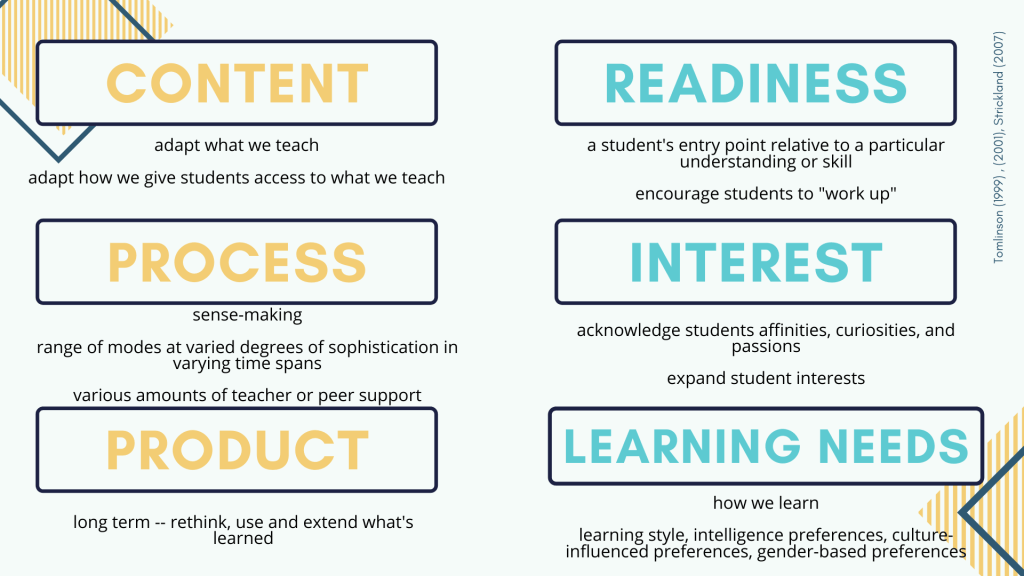
The teacher proactively plans and carries out various approaches to content, process, and product in anticipation of and response to student differences in readiness, interest, and learning needs.


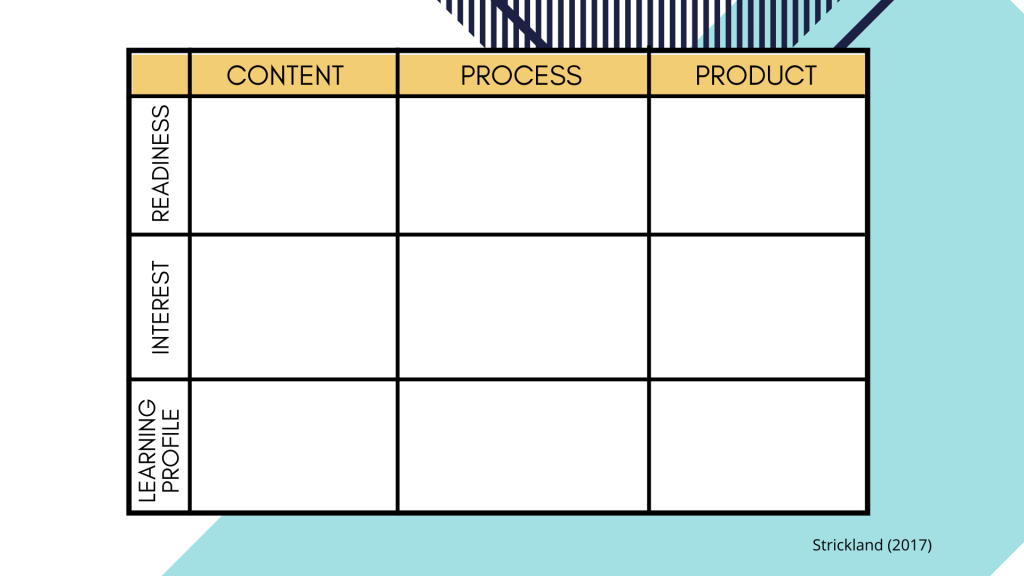
There’s a lot to unpack here, for sure. And a lot of moving pieces. To keep it straight in my head, I try to picture the movement from Stage One through Stage Three of UbD. And in figuring out how I need to differentiate in my learning plan, I picture this Matrix (adapted from here):

Or this one (picture matching the left side with the right with various lines):

adapted from here and here

Differentiation: The Misconceptions

Here’s another way of looking at it:

DIFFERENTIATION ISDIFFERENTIATION IS NOT
Providing multiple approaches to content, process and product. Individualized education that assumes a separate level for each learner
Student-centeredTeacher-centered
Blend of whole-class, group, and individual instructionChaotic
ProactiveModification of standards/outcomes
QualitativeQuantitative (assigning more or less)
Rooted in assessment Another way to provide homogeneous grouping
Over-emphasis on one instructional strategy
Tomlinson (1999) , (2001), Strickland (2007)

Now that we have differentiation in theory, please join us for our next installment, Differentiation, Part II, where we discuss specific strategies to implement in order to address the diverse needs of our students.

REALity Check S1 E13: Differentiation, Part II

Welcome back! In the most recent episode of REALity Check, I talked about differentiation more philosophically. Here, I’d like to quickly address five specific, research-based strategies to addressing differentiation in the secondary regular education classroom. I think we all know that differentiation is key in providing quality, Tier 1 interventions for students, but it’s difficult to actually put it into practice when we have so many other things — covering content, giving quality feedback, grading, managing behaviors.

So I dove into the research. My hope here is to not overwhelm us with ideas, but give us a deep well from which we can draw ideas and inspiration.


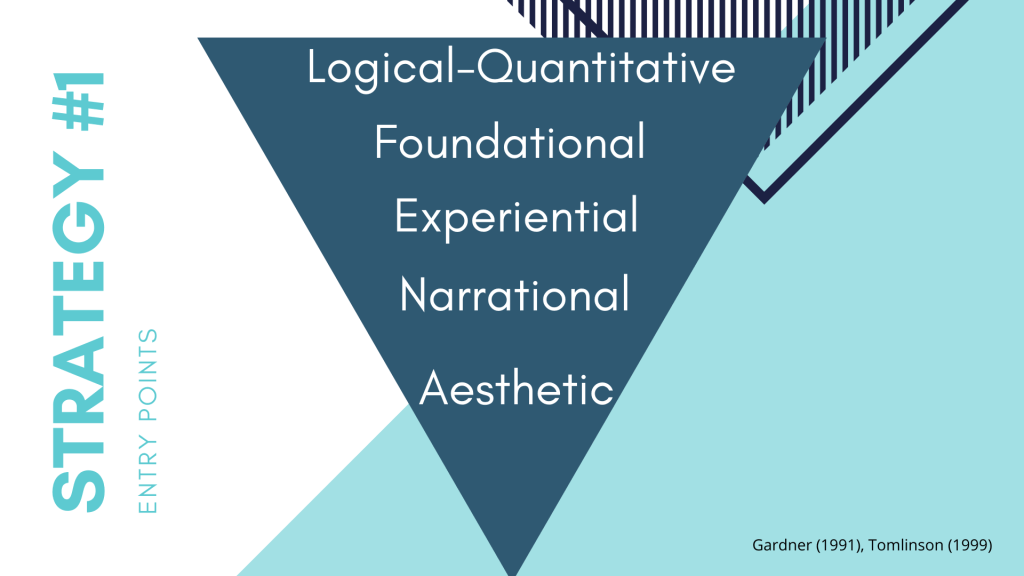
Strategy #1: Entry Points

We all know how important frontloading content is. It engages students and gives them a framework with which to approach the unit. Or, think about the various learning cycles that exist: Explore, Explain, Apply model; the 5E’s model; The Workshop model. Each of these begins with engaging exploration.

But how might we differentiate our entry points to a unit or lesson? What makes something engaging for one may not make it engaging for all.

So let’s talk entry points.

Here, our research is strengthened by Howard Gardner. Each of these various entry points represents a different strength or intelligence.

  • We might offer a narrational entry point by presenting a story or narrative about the topic in question.
  • We might offer a logical-quantitative entry point by using numbers or applying deductive reasoning to the topic in question.
  • We might offer foundational entry points by examining the philosophy and vocabulary that support the topic in question.
  • We might offer aesthetic entry points by focusing on the sensory or artistic features of the topic in question.
  • Or we might offer experiential entry points by using a more hands-on approach where students are involved with materials that represent the topic in question.

(adapted from here)

Have students choose a method, or vary these throughout the semester.


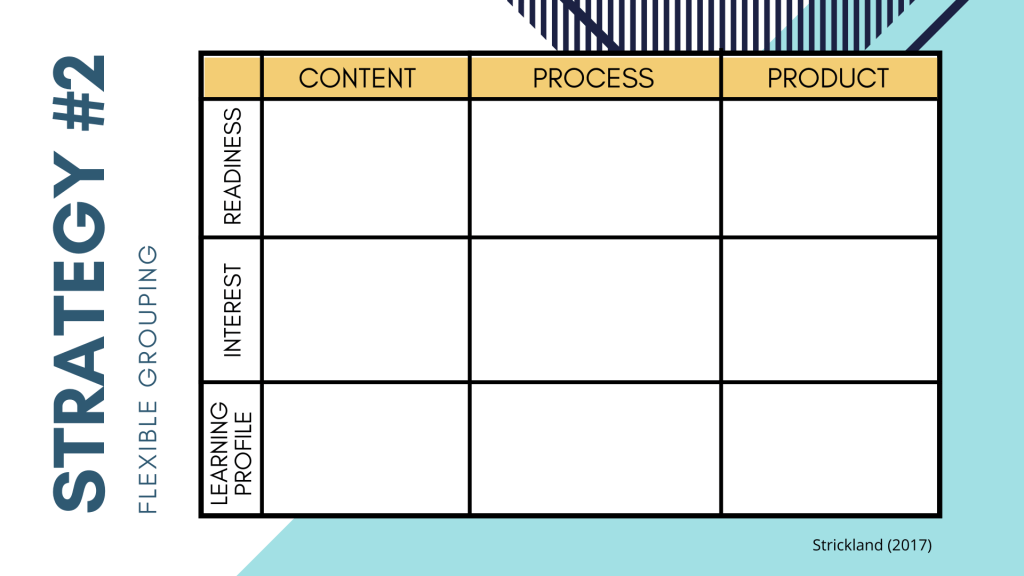
Strategy #2: Flexible Grouping

Most of us incorporate some form of group work all the time. How might we build on that by considering flexible grouping an integral part of a differentiated classroom? How might we offer more robust, flexible options when creating groups?

Consider first what we differentiate based on:

Student Interest

How might you differentiate activities based on what students want to read, investigate, or complete?

Learning Profile

  • Can students work alone? With a partner? In a group?
  • Are they more visual, auditory, or kinesthetic learners?
  • Would students work best analytically, practically, or creatively?
  • Would they rather compete against others? Themselves? Collaborate?
  • Is there a more introverted or extroverted option?

Readiness

  • Do students have learning gaps with prerequisite skills? How could you provide support with graphic organizers, vocabulary lists, minilessons, etc.)
  • Are there differences in reading levels?
  • What about students who come in with a significant body of knowledge, understanding, or skill about a topic? How will you ensure that you collect appropriate evidence? How will these students continue to grow?
  • How will you differentiate the pace of learning, especially for students who are likely to quickly master the material?
  • And… everything else. Writing ability, research skills, resources at home.

How might you create groups based on these indicators? This book has been a tremendous resource for me. Here’s a list of examples of how you might begin to use flexible grouping as a differentiation strategy.

Strategy #3: The HyperDoc

Ahhhh. How do I love the Hyperdoc? Let me count the ways…

Before I get into things, take a look at this presentation my colleague Maureen Ritter and I put together last month for our district’s Teachers Teaching Teachers.

Now, the research here is a lot less developed, but I would argue that it has its roots in the ideas of personalized agendas or choice boards. Maureen and I found a lot of value in this book.

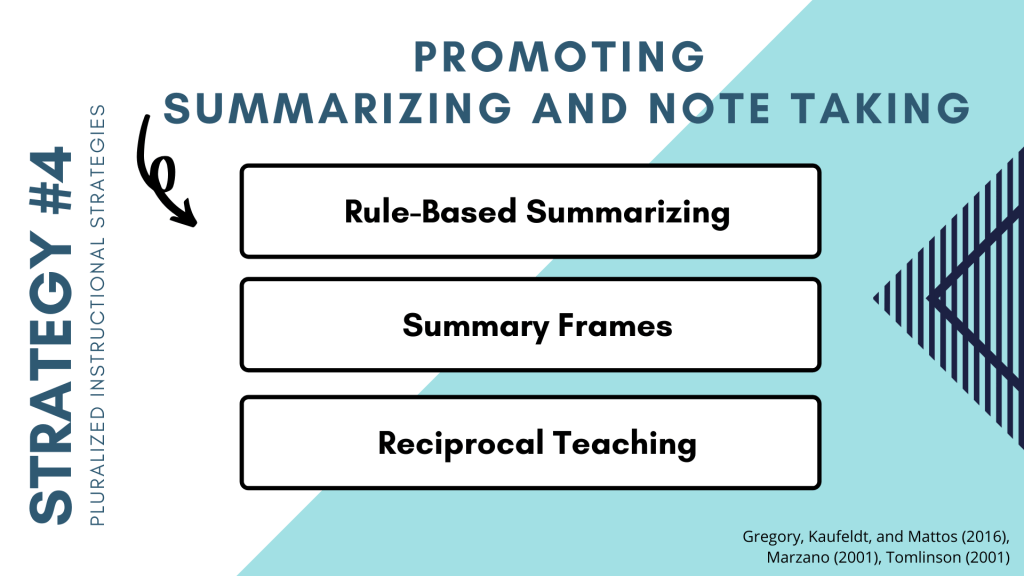
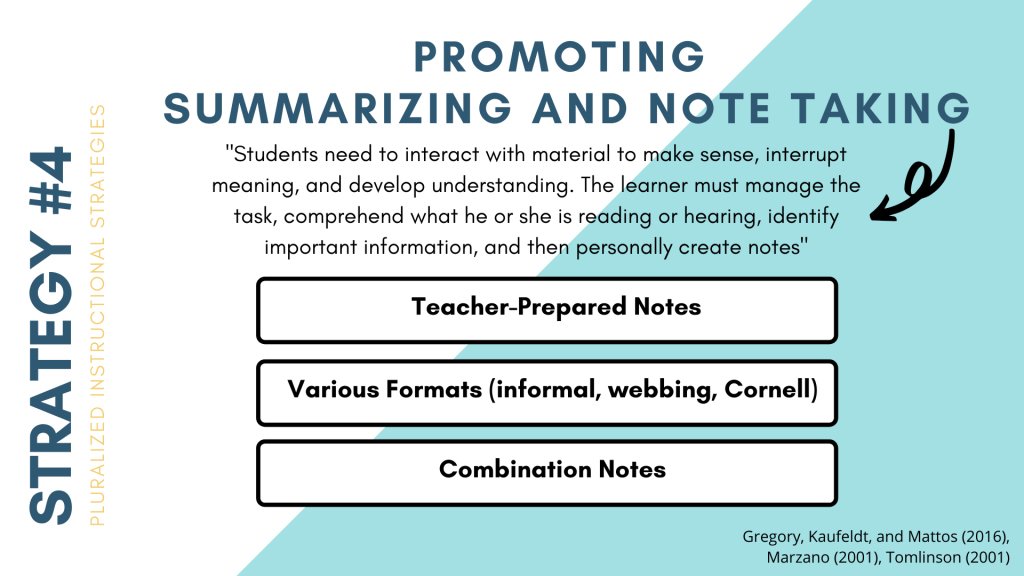
Strategy #4: Pluralized Instructional Strategies

We know what there are key instructional strategies that work cross-curricularly (Think Marzano, people.) As you approach these strategies, how could you provide multiple strategies?

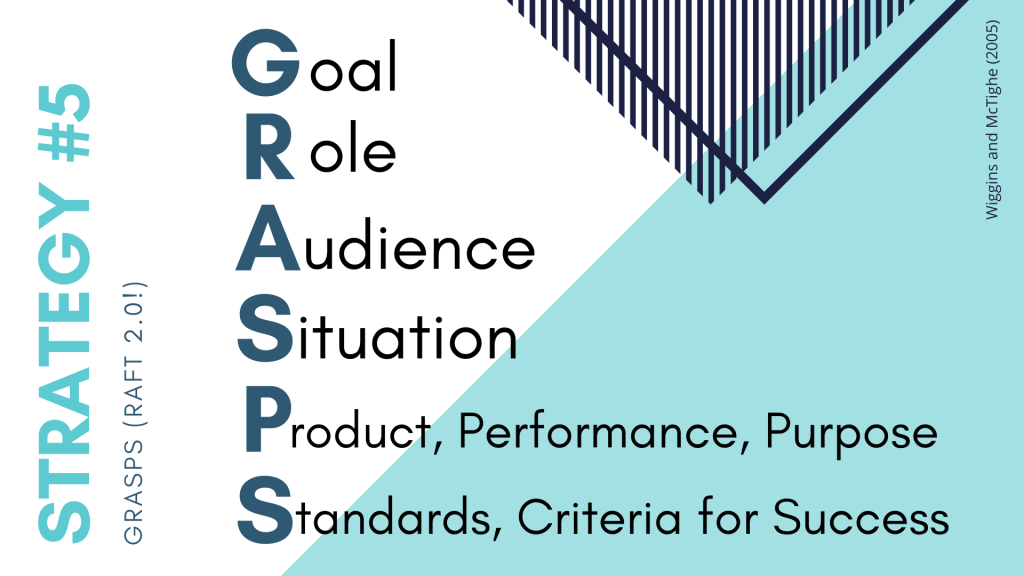
Strategy #5: GRASPS (RAFT 2.0!)

GRASPS isn’t anything all that revolutionary, but I find when I use it as a framework, it allows for student choice in product. Remember, you can hold some of the cards here and control parts of the GRASPS, and give up control in other areas.

How do I start?

Feel free to download the Bingo sheet above. If you get BINGO before the end of the year, contact Shanna or me and we’ll deliver you a prize!

Happy differentiating!

S1 E11 Recap: Five Other Ways to Create in the Classroom

We have spent the last few episodes discussing how teachers and students can be using and creating videos and podcasts as learning tools. In Season 1 Episode 11 of the REALity Check podcast, we run through five other ways students and teachers can create and some questions to consider when planning.

  1. Use tools like Canva, Lucidpress, Piktochart and S’more to create infographics and other digital texts like brochures, magazines, newsletters, posters and social media posts.
  2. Meet the students where they are at, on social media, and have them produce posts or campaigns to demonstrate learning and share their voice. Also consider incorporating new social media trends to help student reach learning targets like Texting Story.
  3. Up your in-class student presentation game by finding alternate locations and inviting authentic audiences to view student work. Encourage students to use tools like Slides Carnival, Canva, Google Slides Q & A, and NearPod to produce more professional presentations.
  4. Can’t bring authentic audiences to the students in person? Use tools like Google Hangouts and Skype to live chat with authentic audiences.
  5. Do some research and figure out how professionals in your fields are creating and sharing their work publically. Encourage your students to investigate these creations and tools used to create and have them utilize these tools to create their own works. Get authentic and relevant by having students engage with authentic tools.

Here are a few questions to consider when planning to have students create…

  • Does the use of the technology add to the authenticity of the experience?  Are they working like professionals in the field?
  • How long will it take the students to learn how to effectively use the technology?  Are the outcomes and improved engagement worth that time?
  • Will the front-loading of how to use the technology help them later in the class, in other classes, or in their lives outside of school?

Listen to REALity Check podcast Season 1 Episode 11 for more explanation on each of the points above or schedule time to chat with an instructional coach for more information.

Join us for our third REALity Check Tech session on February 25th to learn more about Creating Content with Canva.

S1 E10 Recap: Podcasts Part 3: Podcasts as a Product

In part III of our podcast series about podcasts as a learning tool, we explore having students create podcasts to share their voice and demonstrate their learning. Here is a quick recap of what was discussed in REALity Check Season 1 Episode 10.

Getting Started

  • Students need to listen to other podcasts. It is important for students, especially those that don’t listen to podcasts on their own, to know what it is they are being asked to create.
  • Students need to gain an understanding of the structure of a podcast. How are intros, outros, and transitions used by creators? What types of podcast formats are being used by creators? How do each of the components come together to create a whole podcast?
  • Students should write an outline or script for their podcast. Having a detailed plan in advance will help ensure the recording part of the process is efficient and the product is professional.

Recording the Audio

  • Students can use their Chromebooks or their phones to record their audio clips and import them to Google Drive for easy editing access.
  • We encourage students to use WeVideo for editing because access to premium features is available through their Google account. They can use the content library in WeVideo to find music for transitions and sound effects that are free to use.
  • Additional equipment, such as microphones, are available in the LRC for student check-out.

Finishing & Sharing

  • Students & teachers should think about the level of visibility they would like the final products to have. Are they sharing it with the teacher only, posting it in a discussion for other students to hear & respond, or is the product going public? Once the recording has been “finished” out to Google Drive, students have a lot of options for how they want to share their work.
  • Finally, students should take time to self-evaluate and/or reflect on their podcasting experience.

 If you are interested in more PD, join us on February 13 for our second REALity Check Tech in which we provide in-person guidance for podcasts as a learning tool.

S1 E9 RECAP: Podcasts as Texts

In Season 1, Episode 9, we discussed Podcasts as Texts. Creating a culture in the classroom of student choice and differentiation can be tricky. We want to keep instruction motivating and fresh but we still need to ensure we are providing quality resources. Let’s begin by reminding ourselves that text is more than words on paper and we can take a multimodal approach to content and instruction to ensure choice and differentiation for our students. 

Such can be done via PODCASTS (check out Listennotes.com, which is a podcast search engine).


Here are some teaching goals that podcasts can help us achieve:

From a Literary Standpoint

  1. Podcasts can be used in place of traditional text because they provide a way for students to listen to others’ voices and understand others’ perspectives and stories. Podcasts can cultivate their empathy towards others.
  2. Podcasts can increase listening comprehension, vocabulary knowledge, visualization, and critical reading skills, especially if the transcript is paired with the audio. 
  3. Podcast transcripts can be modified into cloze passages to quickly assess students in a variety of ways while they are listening to a podcast and learning something as they listen. How fun to assess WHILE they learn and are engaged!

Delivering Content

  1. Students can listen to a podcast to increase prior knowledge 
  2. While listening, students can still analyze content and work through summarizing content
  3. Students can also choose who they would like to listen to, thus increasing engagement 
  4. And, students can collaborate after listening to different podcasts, possibly podcasts expressing differing points of view or different aspects of the same idea.

Authenticity

And for the sake of authenticity, podcasts are amazing!!!

  1. Students have expert voices at the click of a button: Historians, scientists, and mathematicians discussing the ways in which they LIVE out the skills and content that students are learning
  2. There are primary sources available!
  3. And native speakers podcasting about the culture and events of their country halfway across the world!

Embracing Text Modernity

That being said, we can use podcasts to embrace the modernity of the text and communication. These podcasters want responses and listeners. Students can express their views back by

  1. Writing a response in the comments section
  2. Tweeting at the author
  3. Subscribing & following someone they have come to appreciate.

More than anything, embrace the variety, the choices, the CHANGE. Try Something! 

Create your own website, free on WordPress.com.Create your own website.
Start free